



FREE Basic Digital Literacy Classes
FREE Basic Digital Literacy Class
Help Someone You Love Get Online
You may move through the digital world without thinking about it. You scroll on your phone, send emails, fill out online forms, and look up answers in seconds. But someone you love may not feel that way at all.
They might avoid computers. They might be afraid of “breaking something.” They might feel left out when more and more things in life move online.
American Job Center is offering FREE basic digital literacy classes to help with that. These classes are built for beginners, and you can play a key role by helping someone you care about take the first step.
When Someone You Love Feels Left Out
You may see signs that a loved one is struggling with digital tools:
- They ask you to fill out every online form.
- They avoid email and say, “Just call me instead.”
- They are nervous about online banking or health portals.
- They say things like, “I am too old for this,” or “Computers are not for me.”
They may feel embarrassed to ask for help. At the same time, more and more parts of life depend on basic digital skills, such as:
- Applying for jobs
- Checking pay stubs or work schedules
- Making appointments
- Reading school or community messages
Without these skills, it is easy to feel left behind. But it can also feel overwhelming to start. That is where a simple, friendly class can make a big difference.
How This Class Makes Computers Less Scary
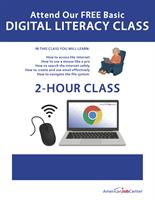
American Job Center is offering a FREE basic digital literacy class that starts right at the beginning. It is not a lecture. It is hands on, patient, and small on purpose.
Each class:
- Lasts 2 hours
- Uses a Chromebook and mouse provided on site
- Is limited to 10 people
- Is offered at locations in Henry County, Mercer County, and Rock Island County in Illinois
- Begins in February 2026
Your loved one does not need to bring a computer. They do not need any experience. The class is designed for people who are brand new or very rusty.
During the class, they will learn and practice:
Getting Comfortable With The Mouse
Many people struggle at this very first step. The class will show how to:
- Hold and move the mouse
- Move the arrow on the screen
- Click, double click, and right click
- Scroll up and down
There is plenty of time to practice, with help right there when needed.
Accessing The Internet
The instructor will walk through:
- Opening a web browser
- Typing in a web address
- Moving from one page to another
They will see how to get online in a simple, repeatable way, instead of guessing which buttons to press.
Searching The Internet Safely
Searching is powerful, but it can also feel risky. The class will show how to:
- Type a question into a search box
- Tell ads from real search results
- Notice basic signs of safer websites
- Be careful about sharing personal information
The goal is not just to get online, but to stay safer online.
Creating And Using Email Safely
Email is important for work, health care, and services. The class will help your loved one:
- Create an email account
- Sign in and sign out
- Read, send, and reply to messages
- Understand subject lines and basic message format
- Recognize common scam or spam messages
They will learn not only how to use email, but also when not to trust a message.
Navigating The File System
The class also covers simple file and folder skills, such as:
- Saving a file
- Finding a file again later
- Understanding what a folder is
- Knowing the difference between files on the device and files online
These skills help with job search documents, school papers, and other important items.
How You Can Support Someone You Care About
You already help your loved one with digital tasks. This class gives you a way to share that work with a team that is trained to teach beginners. You can support them in several helpful ways.
Explain What The Class Is (And Is Not)
You can reassure them that the class:
- Is small, with no more than 10 people
- Moves at a beginner pace
- Provides computers and mice
- Welcomes questions
You can also let them know that they do not have to pass a test. The goal is to feel more comfortable, not to be perfect.
Help With The Practical Details
You can support them by:
- Calling American Job Center together to ask about dates and locations in Henry, Mercer, or Rock Island County
- Helping them sign up for a class
- Writing down the time, place, and directions
- If possible, giving them a ride or helping to arrange one
These small actions can remove barriers that might otherwise stop them from going.
Connect It To Real Life Needs
You can also remind them how these skills will help in daily life, such as:
- Applying for jobs or training
- Reading messages from doctors or schools
- Staying in touch with family through email
- Finding information without having to depend on someone else every time
This helps them see the class as a step toward more independence, not just “more school.”
How American Job Center Fits Into The Bigger Picture
The basic digital literacy class is part of a larger set of services that American Job Center provides for the community.
For people who want to work, change jobs, or explore new careers, digital skills are often the first building block. Once your loved one feels more confident with a computer, it becomes easier for them to:
- Work with a career counselor
- Search for local jobs
- Learn about training programs
- Explore scholarship options for those who qualify
You are not only helping them learn to use a mouse. You are helping them open the door to more choices and more control over their future.
Next Steps
If someone you love feels left out by technology, this is a chance to help them in a simple, respectful way. They do not have to struggle in silence or depend on others for every online task. With patient teaching and your support, they can take real steps toward digital comfort and confidence.
Here are steps you can take now:
- Talk with your loved one about how technology has changed and how normal it is to need help catching up.
- Review the American Job Center Calendar to learn about basic digital literacy class dates and locations in Henry County, Mercer County, and Rock Island County starting in February 2026.
- Help them reserve a spot, since each class is limited to 10 people, and make a simple plan for getting to the class on time. Reservations can by made my calling the contact person for each location, listed in the calendar event.
You already care about this person. This class gives you a concrete way to turn that care into support they can feel every time they sit down at a computer.
Make their next year easier and more connected, with American Job Center by their side.
American Job Center - Rock Island / Workforce Solutions
-
Lori Warren Program Director
- December 04, 2025
- (309) 248-0291
- Send Email
